Tuesday, July 1, 2014

2048 Number Puzzle Game

Most addictive Mobile and Tablet version of 2048 game and almost perfect 2048 number puzzle game for Android! Explore deep challenge for your mind!

Game Instructions

Swipe to move the tiles, when two tiles with the same number touch, they merge into one.
Example: 2+2=4 ... 4+4=8 ... When a 2048 tile is created, the player wins.

Game Features and Advantages


  • The only game version in Google play which works on almost EVERY android devices starting from 2.2+
  • Swipes works for whole screen area
  • Night mode for playing in bed
  • Super 2048 Multiplayer

Download Now


Video Promotion


Sunday, June 8, 2014

Calling Javascript from Android Java coding

In Android application, WebView is the component for display web pages. As Hybrid application are popular now, there are needs of calling javascript method from Android Java coding. We can do this by implement the addJavascriptInterface method in WebView.

The following example demonstarte this:
Step 1: Create a new Android project "JavascriptDemo" in Eclipse. A html web page is created in the assests directory.


Creating 4 different Tween Animation effects

Android platform facilitates three different types of animation you can define in your application resources: property, tween and frame. In this example, we show you how to do 4 different tween animation effect.


Wednesday, May 28, 2014

Simple Android Database Application

Today we are going to build a simple database application in Android. First see the project resources screenshot indicated below.


Android Login System using SQLite

I have already written several posts regarding Android database applications. This post might be similar to those tuts. However this is more complete Android Login System which uses SQLite as its database. All files can be downloaded here.


Android Session Management Using SharedPreferences

In this example creating login page fuctionality and save user data as like in session. After loging user will redirect to login screen and after back button click do not show login page. Using shared preferences to save and get user data globally through out the application


Share With Intents

[This post is by Alexander Lucas, an Android Developer Advocate bent on saving the world 5 minutes. —Tim Bray]

[Please join the discussion on Google+.]


Intents are awesome. They are my favorite feature of Android development. They make all sorts of stuff easier. Want to scan a barcode? In the olden platforms, if you were lucky, this involved time and effort finding and comparing barcode-scanning libraries that handled as much as possible of camera interaction, image processing, an internal database of barcode formats, and UI cues to the user of what was going on. If you weren’t lucky, it was a few months of research & haphazard coding to figure out how to do that yourself.

Saturday, May 24, 2014

Accelerometer Basic Example - Detect Phone Shake Motion

In this example detecting Accelerometer Motion, when Accelerometer force value cross thersold showing an alert for motion detected.

Use:

  1. You can use this example in games based on Accelerometer Motion (Phone Tilt).
  2. You can use this example for battary consumption when using GPS Calls. Combine Screen Wake Sleep Example with this example to consume less battary when calling GPS calls.Later We will give combined example to consume less battery.


Note:


Check this example in real device.

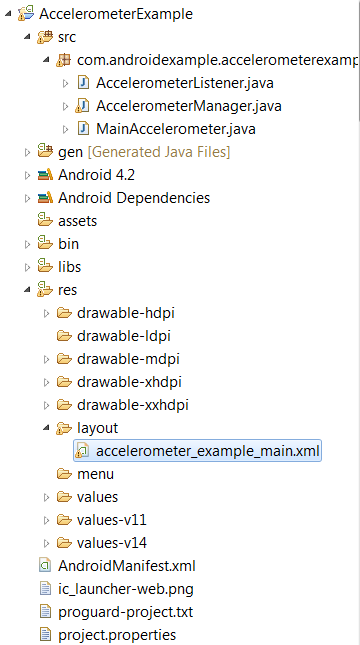
Project Structure:


The ABCs of Android game development: Detect collisions

In the fourth installment of his five-part app developer series, William J. Francis provides the code to be able to detect when the asteroid and the ship collide in this Android game.


The goal of the Android game we are developing in this series is to adjust the flying saucer’s momentum in order to avoid getting smashed to bits by the asteroid. While simplistic, the project incorporates all the essential aspects of a video game: a canvas, sprites, animation, collision detection, and user input.

In our last tutorial we managed to get our sprites moving around the screen. (If you're new to this series, catch up on parts one and two, respectively: Prepare the canvas and Load and display sprites.) Now we need to be able to detect when the asteroid and the ship collide. There are basically two techniques for collision detection: bounding algorithms and image masking. Bounding is easier and takes up fewer CPU cycles than image masking; however, bounding is not normally accurate enough for arcade type games. Just what is the difference? Well, consider our two images. I have them both on a 50x50 pixel background, but the contents of those sprites don't fill the entire 50x50 pixel grid. Take a look at the illustrations in Figure A and Figure B.

Figure A


Friday, May 23, 2014

Intro to Collision Detection: Collision Detection Basics


In this lesson, we will be discussing a few methods of collision detection and how one would go about implementing them.

What exactly does collision detection describe?
To put simply, collision detection is a way of checking for object interaction.

In most real-time games (both old and new), collision detection is an integral element that holds everything together. As such, a poor collision detection system can make the gaming experience painfully frustrating and, in worst scenarios, may even "break" your game.
No one likes broken games.

You should make every effort to implement as fluid and accurate a collision detection system as needed by your game.

Delete row in SQLite database

android.database.sqlite.SQLiteDatabase class provide a convenience method for deleting rows in the database.


A simple example using Android's SQLite database, exposes data from Cursor to a ListView

In previous exercise "A simple example using Android's SQLite database", the result of queue was presented as string. It's going to be modified to exposes data from Cursor to a ListView widget.


A simple example using Android's SQLite database

It's a simple example using Android's SQLite database. A adapter, SQLiteAdapter, is implement as a adapter between our activity and SQLite, with a inner class SQLiteHelper which extends SQLiteOpenHelper.

The SQLite database have only one field, "Content". When the app start, it will open the database and delete all first, then insert some dummy data, then close it. And Re-open, read all content.

Thursday, May 22, 2014

Code Examples of TranslateAnimation

An animation that controls the position of an object. See th android.view.animation description for details and sample code.
  • android.view.animation.TranslateAnimation

Touch Events and Sprite Collision Detection. Android Game Programming

In this tutorial we are going to handle the touch event in the screen and check if the (x,y) coordinates collision with any of our characters sprites.


The first thing to do is add this method in the view to handle each touch in the screen. For each sprite in the sprites list we are going to ask if the (x,y) touch coordinates have a collision. If the collision exists, we remove the sprite from the sprites list. We iterate backwards the sprite list to avoid errors in the next iteration when we remove a sprite.

Wednesday, May 21, 2014

Playing audio example code in an Android application

It is really simple to use audio files in your application. Just like the graphics you use on the display to convey some information to the user, you can use audio to convey information to the user in your application.Android supports music and sound through MediaPlayer class. This class is available in android.media package.

setVolumeControlStream() method is used to tell the Android that the user presses the volume up or down keys while this application is running. This will adjust the volume of the audio file being played instead of the ringer volume.

We need to copy the audio files to /res/raw directory.
Copying a file into the res directory causes the Android eclipse IDE to define a Java identification for you in the R.java class. So we can simply access the audio file using R.raw.filename

Once you are done with this, all you need to do is create a MediaPlayer instance and call start() method.

MediaPlayer mp=MediaPlayer.create(this, resId);
mp.start();


Vibrate Android device with Example

Vibrating Android device is found effective when you wanted to get notified on the incoming connection in various cases like, user cannot hear a ringtone or he wants to get notified silently. Its a very basic feature found in all mobile phones. Lets see how to vibrate an android device programatically. Its just two lines of code.


Android : how to check if device has camera

In Android, you can use  PackageManager hasSystemFeature()  method to check if a device has camera, gps or other features.

See full example of using  PackageManager  in an activity class.

package com.mkyong.android;
 
import android.app.Activity;
import android.content.Context;
import android.content.pm.PackageManager;
import android.os.Bundle;
import android.util.Log;
 
public class FlashLightActivity extends Activity {
 
 @Override
 public void onCreate(Bundle savedInstanceState) {
  super.onCreate(savedInstanceState);
  //setContentView(R.layout.main);
 
  Context context = this;
  PackageManager packageManager = context.getPackageManager();
 
  // if device support camera?
  if (packageManager.hasSystemFeature(PackageManager.FEATURE_CAMERA)) {
   //yes
   Log.i("camera", "This device has camera!");
  }else{
   //no
   Log.i("camera", "This device has no camera!");
  }
 
 
 }
}

Camera flashlight example

You may interest on this example – How to turn on/off camera LED/flashlight in Android.

How to turn on/off camera LED / flashlight in Android

In this tutorial, we show you how to turn on/off the phone camera led or flashlight in Android. See code snippets :

1. Turn on
camera = Camera.open();
Parameters p = camera.getParameters();
p.setFlashMode(Parameters.FLASH_MODE_TORCH);
camera.setParameters(p);
camera.startPreview();


Tuesday, May 20, 2014

Android SDK: Creating a Simple Property Animation

With Android you can include various types of animation in your apps. In this tutorial we will create a basic property animation using Android's Object Animator and Value Animator classes. The result will be simple but the techniques involved will apply in more complex animated effects. We will create an animation in which a steering wheel turns and the background scene moves accordingly.

With property animation, you have a few more options than with View animation, for example you can animate UI items other than Views and can animate more properties. Property animation can also have more consistent results in some cases, as unlike View animation, it alters the UI objects themselves, rather than just drawing them in particular ways. The downside to these advantages is that property animation is a little more complex - but it's still accessible for beginners.